AppRig™
One dockable sidebar for the dozen tiny utilities you reach for all day.
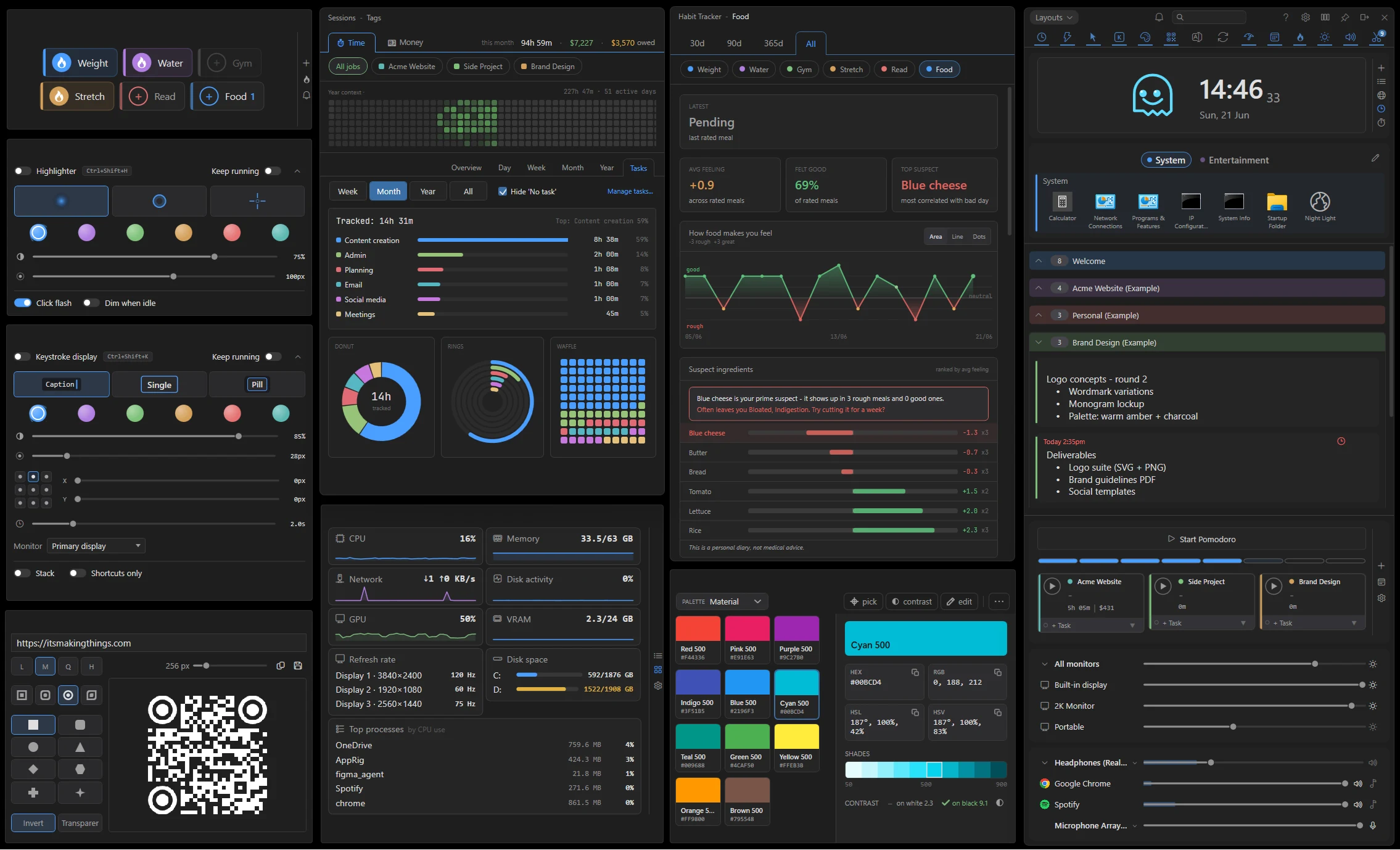
Your desktop fills up with little single-purpose apps: one for notes, one for the clipboard, one for brightness, another for the time. Each one costs you an alt-tab and a flicker of focus. AppRig gathers them into one tidy strip docked to your screen edge, a single click from the tray. Notes and stickies, clipboard history, time tracking, quick launch, per-monitor brightness, and a per-app audio mixer, all local-first with no account, no telemetry, and no subscription.
Notes and lists
Three-state cards (single line, three lines, fully expanded), drag to reorder, pin to top, star to favorite. Pop any card out as a sticky that floats over your desktop. Due dates with tray-toast reminders for the things you can't afford to forget.
Clipboard history
Every text snippet and image you copy lands in a dedicated list. Click any entry to re-copy. Pin the ones you want to keep; the rest age out. Password managers and apps marked as sensitive are skipped automatically.
Quick Access launcher
Tiles for one-click launching of files, folders, apps, and websites. Drag in from File Explorer or the browser. Organize by workspace, launch elevated, pass command-line arguments when you need them.
Time tracker
Per-project timers with a global hotkey, idle detection, and an optional Pomodoro side-cycle. The sessions dialog edits times inline, attaches notes, and exports CSV. Per-hour rates answer the 'how much did I bill this week?' check without a spreadsheet.
Per-app audio mixer
System volume plus a slider per running app. Spotify, Chrome, your DAW, your build's audio source. Adjust on the fly during a meeting or stream without diving through the Windows Volume Mixer dialog.
Per-monitor brightness
A slider per connected display, driven by DDC/CI for externals and WMI for built-in panels. Master tile shifts every monitor together. Optional time-of-day auto-adjust ramps brightness up at sunrise and down at sunset.
Color picker and palettes
Material, Tailwind, and Web Safe palettes built in. Save your own. Screen-wide eyedropper for grabbing pixel colors. Right-click any swatch for Copy-As (hex, RGB, HSL, CSS variable) or a WCAG contrast checker.
Timers and stopwatches
Spawn countdowns from preset chips (5, 10, 30, 60 min) or count up from zero. Run any number in parallel. Click the time to type a custom duration. Tray-toast when a timer hits zero so you don't have to be watching.
Batch file rename
Stack ordered rules (remove, prefix, suffix, replace, sequential number, case conversion) with a live preview and inline diffs. Conflict detection before apply. Atomic apply with full undo on the last batch.
Image conversion
Batch conversion across JPG, PNG, WebP, BMP, GIF, TIFF, TGA, and QOI. Optional resize (fit-within, exact, percentage), quality slider, lossless toggle for PNG and WebP. Drop a folder, pick the output, run.
QR code generator
Turn any text or URL into a QR code that renders live as you type. Pick the error-correction level and export size, restyle the modules and corner anchors (rounded, dots, diamonds, and more), invert the colors, or export on a transparent background. Copy it straight to the clipboard as an image or save a PNG. Pure offline rendering, no network calls.
Mouse Highlighter
A cursor halo for screen-shares, demos, and recordings. Glow, ring, or crosshair styles. Six colors, opacity and size sliders, optional click-flash and dim-when-idle. Global hotkey to toggle without focusing AppRig first.
Keystroke Display
On-screen overlay of the keys you press, for tutorials and screencasts. Stream, caption, single, or stack modes. Six colors, nine anchor positions. Shortcuts-only mode hides plain typing so the overlay isn't flooded.